

MCP — The What
At the end of Part 1, I said I'd built a small MCP server to kill my own copy-paste problem. This post is me putting that server on the table and pointing at the parts.
Part 1 was the why — the N×M integration mess, and how MCP collapses it to N+M. This is the what: what's actually inside the connection between an AI and a tool. Not the marketing diagram with one arrow labelled "MCP" — the real anatomy. The roles, the things a server hands over, the exact JSON that crosses the wire, and the pipe it crosses through.
Fair warning: this one is pure plumbing. But it's the kind of plumbing where, once you've seen it, the whole protocol stops feeling like magic and starts feeling like something you could have designed yourself. I've made the diagrams playable so you can poke at each part instead of squinting at a static picture.
The simplest version
Strip MCP down to its smallest honest shape and you get three boxes.
You talk to the Host. The Host talks to the Server. The Server talks to the actual service. That's the whole skeleton. Everything else in this post is detail hung on these three bones.
But there's a part hiding inside the Host that does all the real work, and it's the piece most explanations skip.
The Client lives inside the Host
The Host doesn't talk to servers directly. It spawns a Client for each one — and the rule that surprised me is that it's strictly one Client per Server. A dedicated 1:1 connection, every time.
Why bother with this middle layer at all? Why not let the Host poke each service itself? Because that 1:1 boundary buys you three things that matter once you have more than one tool open:
The whole anatomy, in one diagram
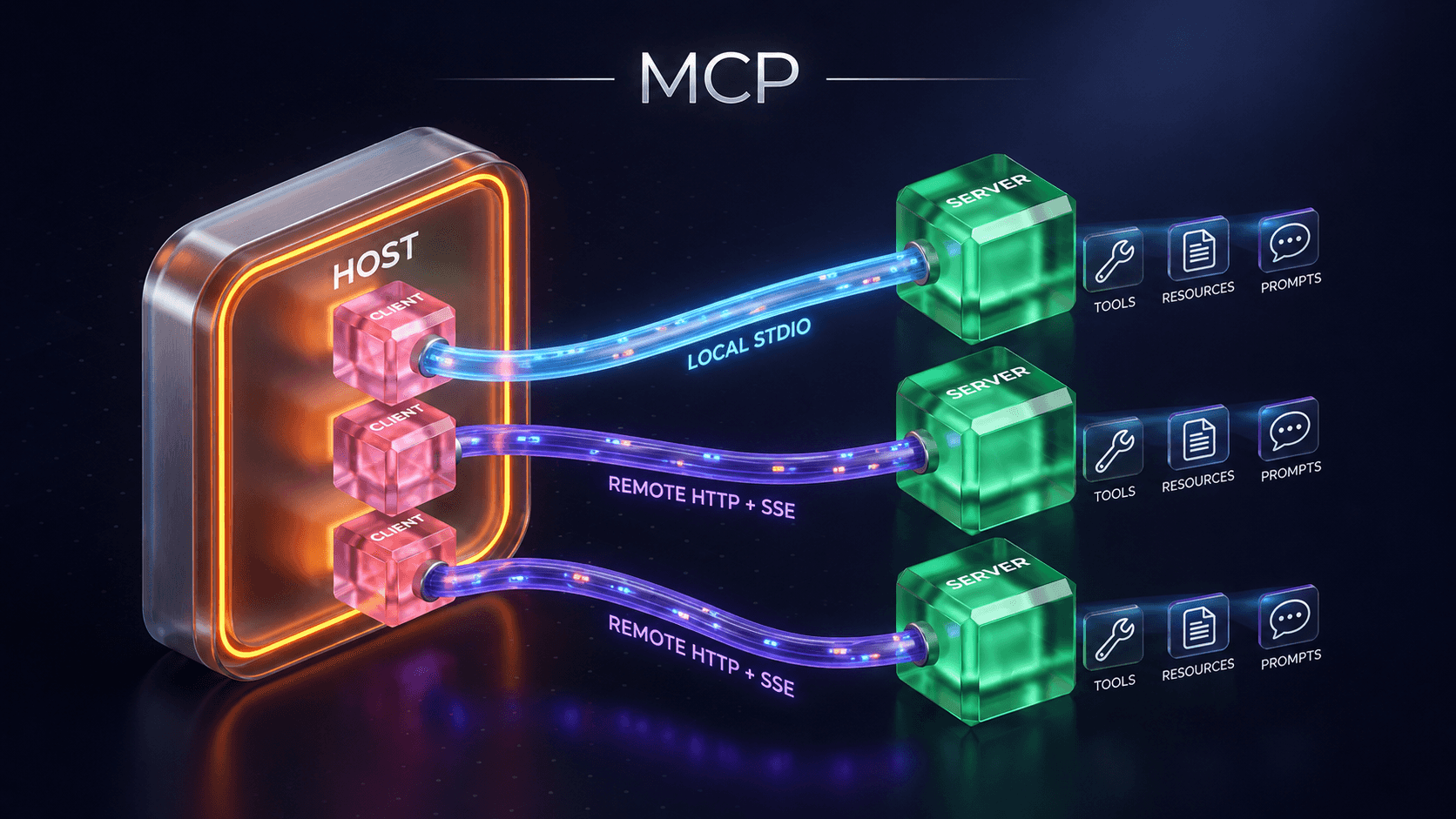
Here's the full picture — the same shape my own setup runs every day. Two Clients in the Host, one wired to a local Filesystem server, one to a remote GitHub server. Each server offers the same three kinds of thing. Each connection runs over a different pipe.
Don't try to absorb it all at once. Tap a part to dissect it — the rest of the post zooms into each one in turn.
1 The Host — where you and the model live
The AI application itself. It owns the model, the chat window, and the decision of which servers to connect to. It never speaks GitHub or SQL directly — it only speaks MCP, through its Clients. Think Claude Desktop, Cursor, or a coding agent.
2 The Client — one dedicated connection
A connector that lives inside the Host, bonded 1:1 to a single Server. It handles the handshake, keeps the session alive, and shuttles messages back and forth. Three servers means three Clients — each blissfully unaware of the others.
3 The Server — a service, wrapped
A standalone program that wraps exactly one service and exposes it in MCP's language. It hides all the painful bits — auth, rate limits, data-format translation, error handling — behind a clean set of capabilities. Write it once; any MCP-aware Host can use it.
4 Primitives — what the Server offers
The three categories of thing a Server can hand to the Host: Tools (actions the AI can run), Resources (data the AI can read), and Prompts (templates that shape how the AI behaves). The next section is a full teardown of all three.
5 Transport — the pipe the messages cross
Every message is JSON-RPC 2.0, but it can travel two ways. A local server runs as a subprocess and talks over STDIO. A remote server lives across the network and talks over HTTP + SSE. Same language, different pipe — covered at the end.
That diagram is the map for the rest of the post. We'll walk it in order: what a server offers (primitives), the language every message is written in (JSON-RPC), and the pipe it travels through (transport).
Primitives — the three things a server can offer
A primitive is just "a thing the server can do for the Host." There are exactly three categories, and the cleanest way I've found to keep them straight is who's in charge of each.
tools/listClient asks: "what tools do you provide?"tools/callClient says: "run this tool with these arguments."resources/list"what resources are available?"resources/read"give me the content of this resource."resources/subscribe"tell me when this one changes."resources/unsubscribe"stop telling me."prompts/list"what prompt templates do you provide?"prompts/get"fetch this specific template."Tools and resources clicked for me immediately. Prompts took a second look — so let me show the example that made it land.
Why prompts earn their place
Say you ask an AI to "create an issue for a bug: the login button doesn't work." Left to its own devices, it writes something technically correct and completely useless:
The template itself is just data the server hands over — a little JSON contract:
{
  "name": "issue_report_prompt",
  "description": "Write clear, detailed GitHub issues",
  "messages": [
    {
      "role": "system",
      "content": "Always include: Title, Steps to Reproduce, Expected, Actual, Environment"
    }
  ]
}
That's the payoff of prompts: the people who build the GitHub server know what a good issue looks like, so they bake that expertise into a template every client can pull. You don't have to be a prompt engineer — the server already is one.
The data layer — one language for everything
Notice that every primitive operation above is a verb: tools/list, resources/read, prompts/get. They all need to cross the wire in a format both sides agree on. That shared format is the data layer, and in MCP it's exactly one thing:
The name unpacks into the two ideas it staples together:
add(2, 3) yourself, you send a message: "please run add with params 2 and 3." The network is hidden.Put them together and you get a tiny, rigid grammar. There are only a handful of message shapes — and once you've seen them, MCP traffic reads like English. Flip through them:
{
  "jsonrpc": "2.0",
  "id": 1,
  "method": "tools/list",
  "params": {}
}{
"jsonrpc": "2.0",
"id": 1,
"result": {
"tools": [
{ "name": "github.listIssues" },
{ "name": "github.listPulls" }
]
}
}{
"jsonrpc": "2.0",
"id": 2,
"method": "tools/call",
"params": {
"name": "github.listIssues",
"arguments": {
"owner": "ownerName",
"repo": "repoName"
}
}
}{
"jsonrpc": "2.0",
"id": 2,
"result": {
"content": [
{ "number": 42,
"title": "Login bug" }
]
}
}[
{ "jsonrpc": "2.0", "id": 5,
"method": "tools/call",
"params": { "name": "github.listIssues" } },
{ "jsonrpc": "2.0", "id": 6,
"method": "tools/call",
"params": { "name": "github.listPulls" } }
][
{ "jsonrpc": "2.0", "id": 5,
"result": { ...issues... } },
{ "jsonrpc": "2.0", "id": 6,
"result": { ...pulls... } }
]{
"jsonrpc": "2.0",
"method": "files/updated",
"params": {
"fileId": "abc123",
"name": "ProjectPlan.docx",
"updatedBy": "alice@..."
}
}// none. // A notification has // no "id", so there is // nothing to reply to. // Fire and forget.
{
  "jsonrpc": "2.0",
  "id": 7,
  "method": "tools/call",
  "params": {
    "name": "github.listIssues",
    "arguments": { "owner": "owner" }
  }
}{
"jsonrpc": "2.0",
"id": 7,
"error": {
"code": -32602,
"message": "Missing required field 'repo'"
}
}Read those five and you've read the entire data layer. Notice how little there is to it: a version stamp, a method, some params, an id to match replies — and that's the lot. The constraints are doing real work. So why pick JSON-RPC specifically?
A small honesty note: the CampusX notes I learned this from describe the remote transport as "HTTP + SSE", which is how MCP shipped originally. The spec has since folded that into a single "Streamable HTTP" transport. The mental model below is identical — POST a request, stream the replies — so I've kept the SSE framing the notes use and flagged the rename here.
The transport layer — same language, two pipes
JSON-RPC is what gets said. The transport layer is how it's carried between Client and Server. And here's the elegant bit: because JSON-RPC is transport-agnostic, MCP can use a completely different pipe depending on where the server lives — without changing a single message.
The choice isn't arbitrary; it falls straight out of where the server is. On your machine? STDIO. Across the network? HTTP. Let me make the local case concrete, because it's the one I touch most.
STDIO, the part that finally demystified it
"Talks over stdin and stdout" sounded fancy until I remembered I do this every day without thinking. Run a script, type something in, it prints something back:
STDIO transport is exactly that, with JSON-RPC as the lines. The Host launches the server as a subprocess on the same machine, writes a JSON-RPC request into the server's stdin, and the server writes its JSON-RPC response back out its stdout. No ports, no sockets, no HTTP — just two pipes between a parent process and its child.
This is the part I find genuinely neat once it clicks. Here's what that channel actually looks like for a real server — mine:
Closing the loop: my own server, dissected
Everything above is just theory until you map it onto something real, so here's mine. The notes for this post came out of a small OneNote MCP server I run — and now you have the vocabulary to describe it exactly:
list_pages, extract_page — actions Claude called by name.The detail I like: my server is local (STDIO between Claude and the server), but it then reaches out to a remote API (Microsoft Graph over HTTPS) on the other side. The transport you pick is about the hop between Host and Server — not about what the server does once it's holding the request. Wiring it up was the usual ritual from Part 1: a few lines in a config file, point the Host at the server command, restart, and the tools just appear. I've edited that config more times than I'd like to admit — but the model held every time. The whole connection, from the chat box to my notebook, is exactly the anatomy on this page.
That's the what. Three layers — primitives a server offers, the JSON-RPC language they're spoken in, and the transport that carries them — wrapped around a Host, its Clients, and the Servers they bond to. None of it is clever. It's just consistent, and consistency is the entire point.
What's next
This was Part 2 — the anatomy. In Part 3 — The How, I stop pointing at the parts and start building one: a real MCP server from an empty file, the SDK, defining tools, and wiring it into a client so it shows up the way the OneNote server does for me. The theory on this page is about to become code.
References and Resources
- Architecture overview — Model Context Protocol docs — the canonical breakdown of host, client, server, primitives, and the data/transport layers.
- MCP Specification — the exact wire format: JSON-RPC messages, lifecycle/handshake, and capability negotiation.
- Transports — MCP docs — STDIO and the (now consolidated) Streamable HTTP transport, in detail.
- JSON-RPC 2.0 Specification — the tiny grammar the whole data layer is built on, including the standard error codes.
- Introducing the Model Context Protocol — Anthropic — the original announcement.
Massive Shoutout to CampusX
These notes are my write-up of the CampusX "MCP — The What / Architecture" walkthrough — the same series I credited in Part 1, Skills in Claude Code, and Gen AI without the Hype. Still the clearest explanations of fast-moving AI tooling I've found. Subscribe to the CampusX YouTube channel if any of this landed.