

Skills in Claude Code
I've been using Claude Code daily for a while now. Most of the time it just works — I describe a task, it writes the code, I review and merge. But every so often I'd hit a task where the model knew the shape of the answer but kept missing the specifics. PowerPoint decks. Internal style guides. The way I like my work-experience entries phrased on my own portfolio site. Things that aren't hard, just particular.
CampusX dropped a video that put a name on this gap and showed how the relatively new Claude Code primitive — Skills — closes it. What follows is my walkthrough of those notes, plus what I learned trying to actually ship a library of them on a real project.
Why Skills?
Claude is a general-purpose language model. That phrase covers a lot of ground — reason, write, code, summarise, translate, plan. But there's a real difference between general capability and reliable, high-quality output for a specific task type. The first is what gets it on the marketing site. The second is what makes it useful for the same job, over and over, the way you'd want it done.
✓ Slides roughly right
· Title font: generic
· Layout: default template
· Closing slide: arbitrary
✓ Title case: your house style
✓ Content cited inline
✓ Closing slide: Q&A (always)
The example the video opens with is PowerPoint generation. Ask Claude to make a deck and it will try — it knows what PowerPoint is, it can reason about slide structure, it knows which Python library to reach for. You get a deck that works. The content is roughly right. But it doesn't know your fonts, your title-case rules, the fact that every internal deck at your company ends on a Q&A slide.
And this same gap shows up everywhere.
The pattern is identical across all of them. Claude has the general capability, but the specialised, "the way we actually do it here" version of the task lives in details the model doesn't have access to.
The instinct, of course, is to write a really good prompt.
This is the problem Skills are designed to solve.
What are Skills?
The one-line version: a Skill is a folder of files that teaches Claude how to do one specific thing well. It's reusable, file-based, and bundles the instructions with the resources Claude needs to act on them.
The folder has a fairly strict shape:
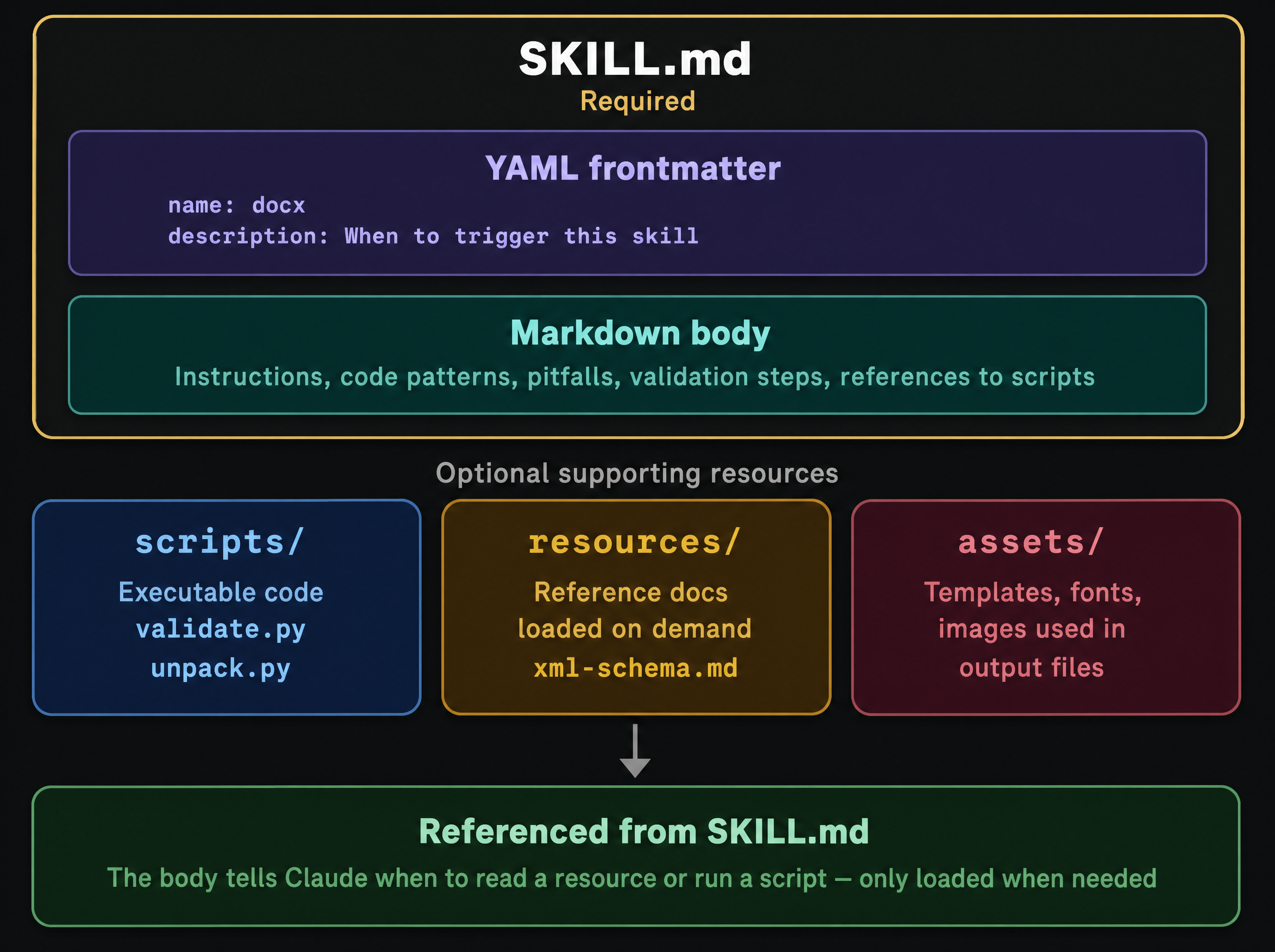
SKILL.md is the only required file. It opens with YAML frontmatter — a name, and crucially a description that tells Claude when this skill should fire. The markdown body underneath is where the actual instructions live: workflows, code patterns, pitfalls to avoid, validation steps, and references to the supporting files.
Around SKILL.md, three optional folders show up by convention:
scripts/— executable code that Claude can run (thinkvalidate.py,unpack.py).resources/— reference docs loaded on demand (a schema, a style guide, an XML grammar).assets/— templates, fonts, and images that end up inside the output the skill produces.
The body of SKILL.md tells Claude when to read a resource or run a script. None of those files load until Claude actually needs them. Which brings us to the part I think is the cleverest bit of the whole design.
Progressive Disclosure
This is the design principle that makes a library of Skills viable in a context window with a finite budget. The core idea: don't present information to Claude until the moment it's needed.
1
always loaded
The description
cost
~30–50 tok
2
loaded on demand
The SKILL.md body
cost
only if used
3
loaded if needed
Referenced resources
cost
per file
resources/ at zero cost until the moment it's needed.
The practical consequence is the bit worth internalising. Each skill in your library costs roughly 30–50 tokens of startup overhead, and that cost doesn't compound — Claude only pulls in the full content of the one it's actually using on this turn.
It's not "load everything, let the model pick". It's "load nothing, let the model ask for what it needs". Once that clicked I started writing skills more aggressively, since the marginal cost of adding one to the library is essentially nothing.
A bigger picture — Anthropic's own framing
The CampusX walkthrough above is the best one I've found for how to write one. A few weeks later I came across Anthropic's own talk — Barry Zhang and Mahesh Murag's "Don't Build Agents, Build Skills Instead" — and it filled in the part the implementation tutorials don't usually cover: where this thing actually sits in the larger stack. A few slides from that deck are worth lifting in here.
Moving up the stack
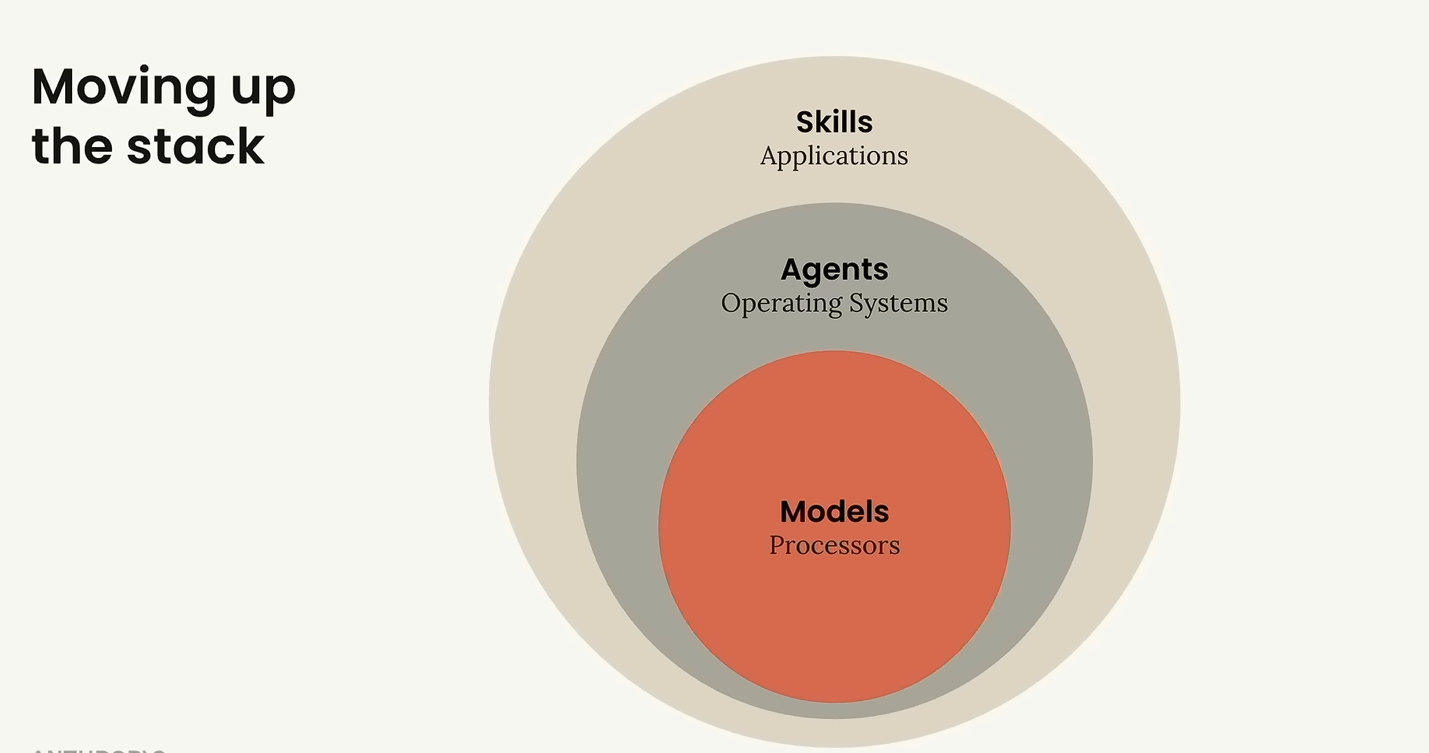
This is the framing I keep coming back to. Models are the processors — raw capability. Agents are the operating systems — routing, scheduling, deciding what runs next. Skills are the applications — the actual thing the user wants done.
If you've been around computers long enough, you know which layer the useful work lives at. People don't buy CPUs to compute; they buy spreadsheets and browsers. The same shift is starting on top of the model layer — and Skills are the format that lets it happen without each application reinventing the agent runtime underneath it.
Skills are just folders (and that's the point)
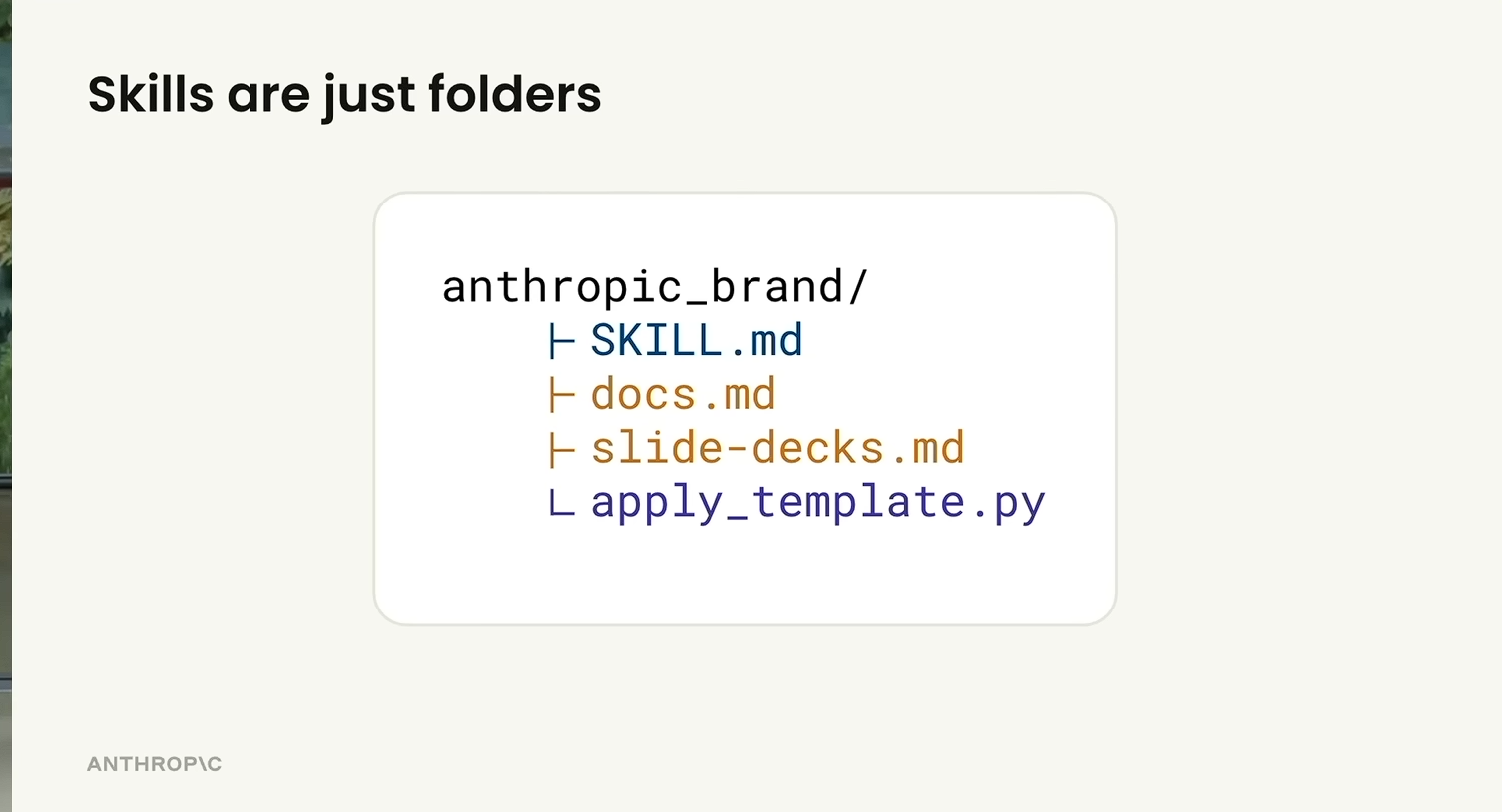
The whole pitch is in those four lines. A folder. A SKILL.md. Some optional sibling files. No SDK, no schema, no runtime. The portability comes from the fact that there's nothing to port — zip it, email it, drop it into another repo, done.
The Skills ecosystem
The talk broke the ecosystem into three tiers, which I hadn't seen laid out cleanly anywhere else:
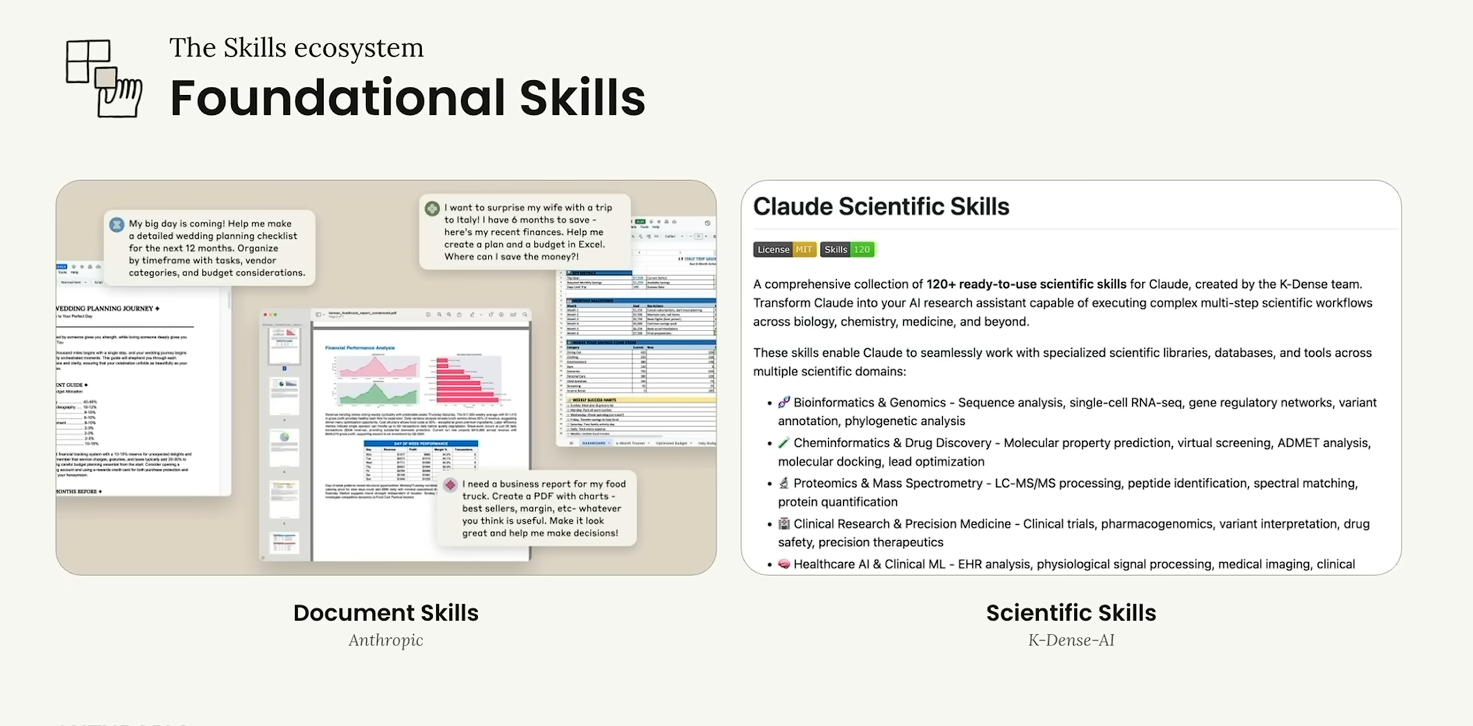
Foundational skills — horizontal capabilities anyone could plug in. Anthropic's own Document Skills sit here; so do domain bundles like X-Driver-AI's Scientific Skills for life-sciences workflows.
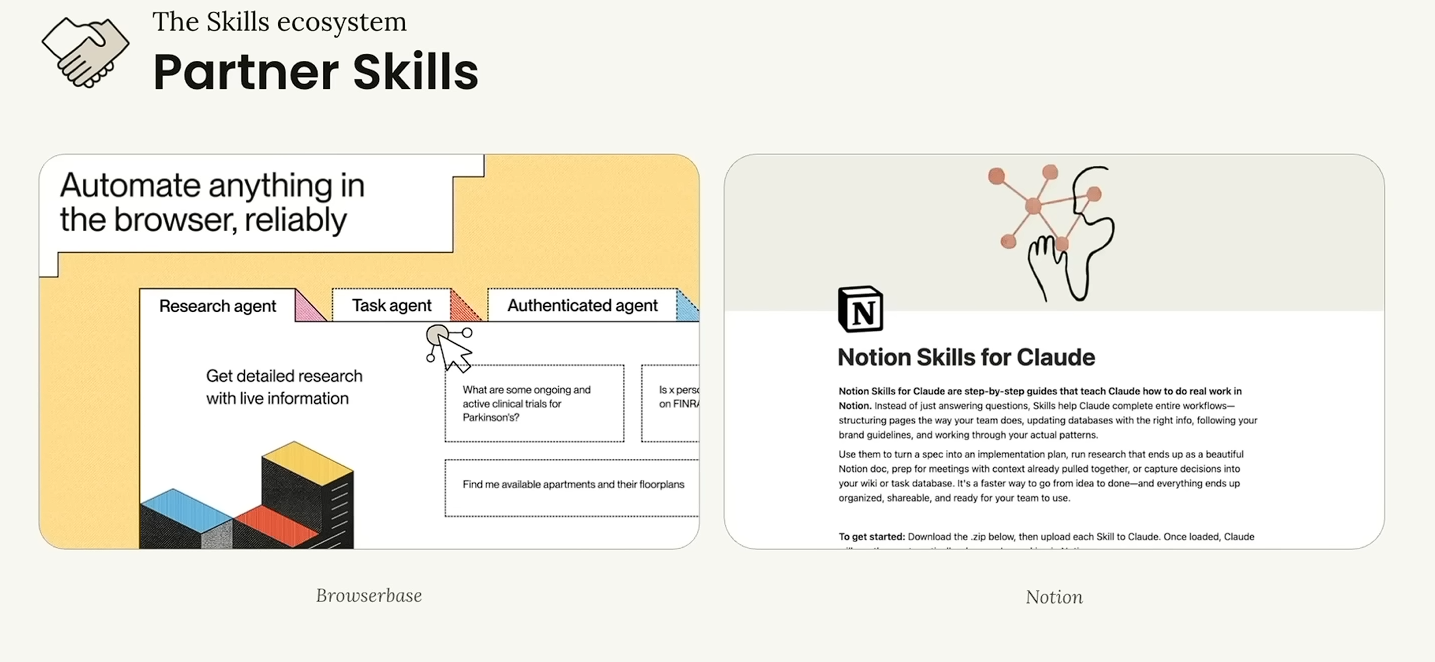
Partner skills — third parties (Browserbase, Notion) shipping Claude-callable skills that wrap their own product. The Notion one is the interesting pitch: instead of Claude answering questions about your Notion, the skill teaches it to follow your team's actual page structure and do the work directly in Notion.
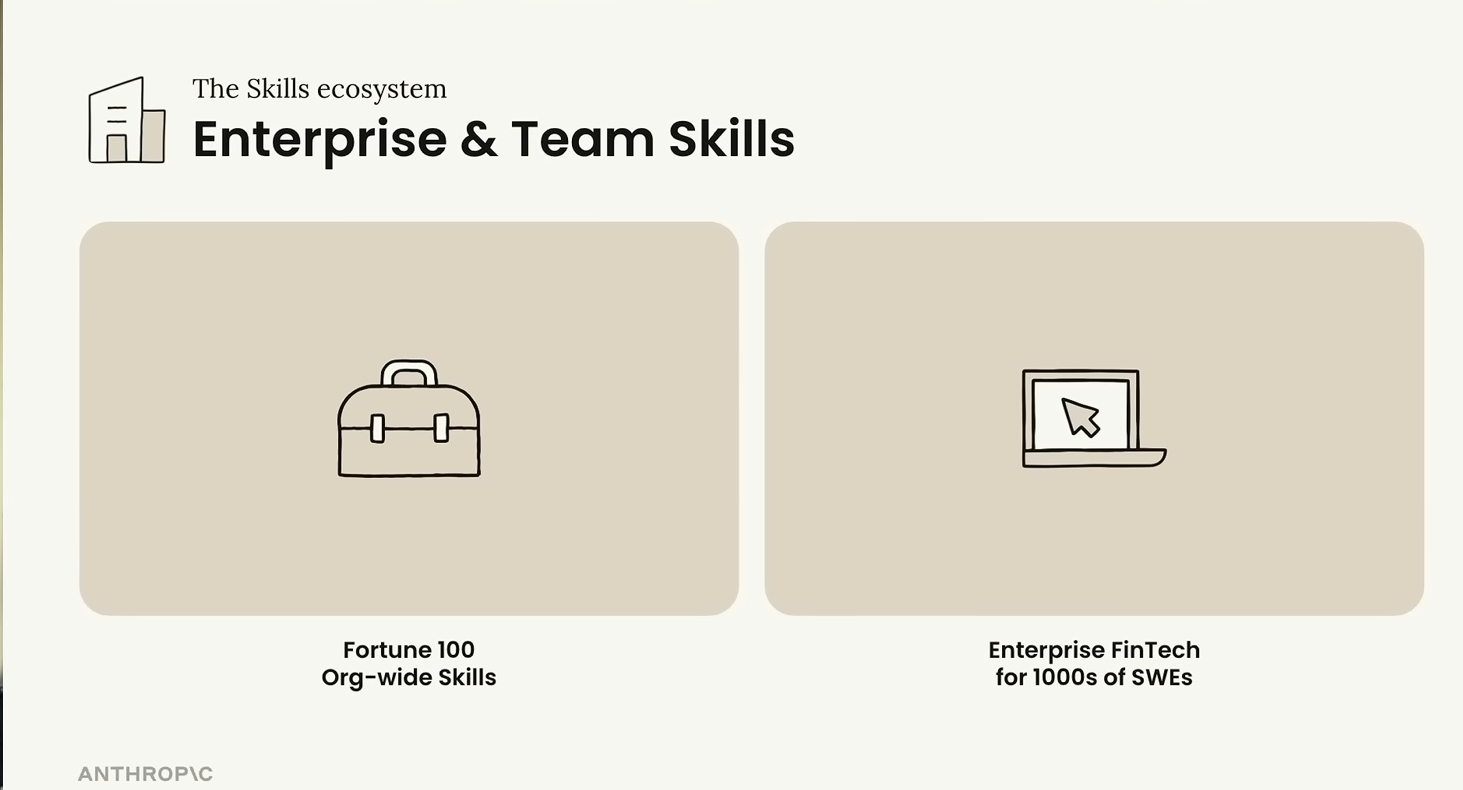
Enterprise and team skills — internal libraries. They cited a Fortune 100 building an org-wide skills library, and an enterprise fintech rolling this out to thousands of SWEs. This is the layer I think most companies haven't yet noticed they need.
How Skills + MCP fit together
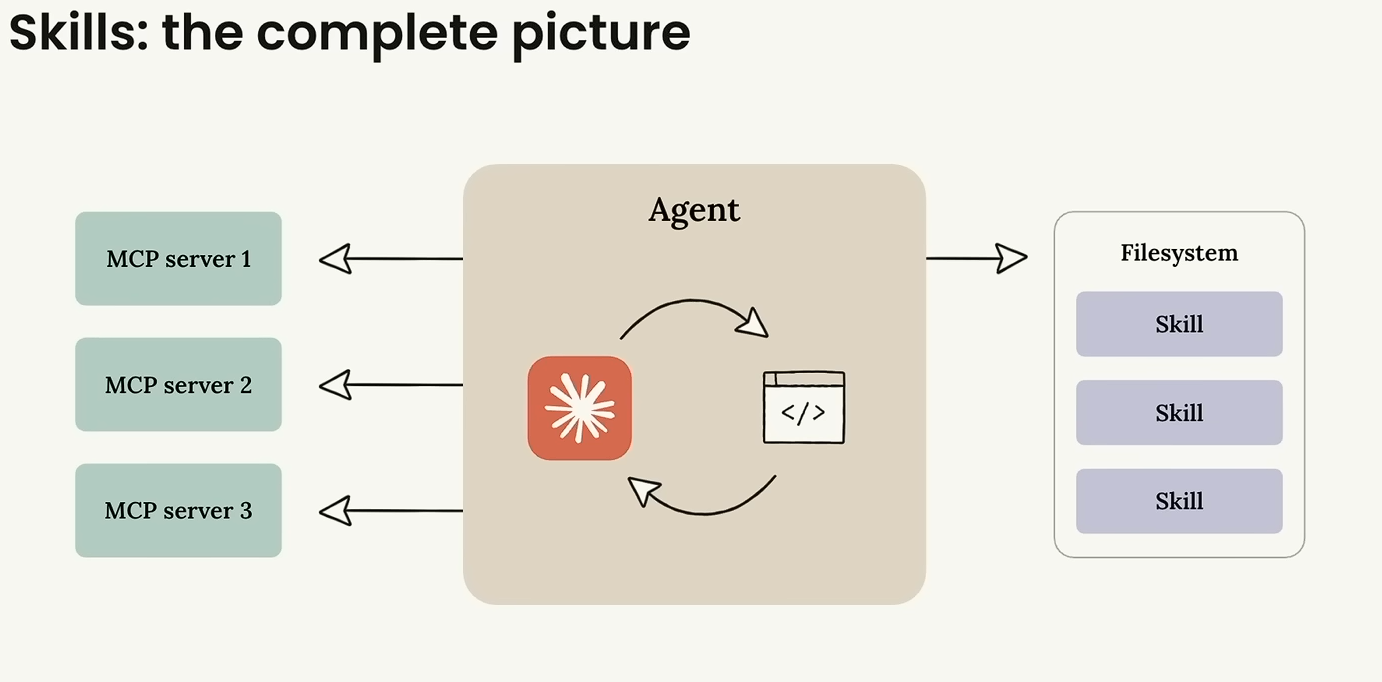
This slide quietly answered a question I'd been carrying around: do Skills replace MCPs? No. MCP servers are the connection outwards — to a live database, an API, a browser session. Skills are the instructions and resources on disk for how the team does this kind of work. The agent in the middle uses both: MCP for what the world looks like right now, Skills for how we do this here.
How a Skill matures
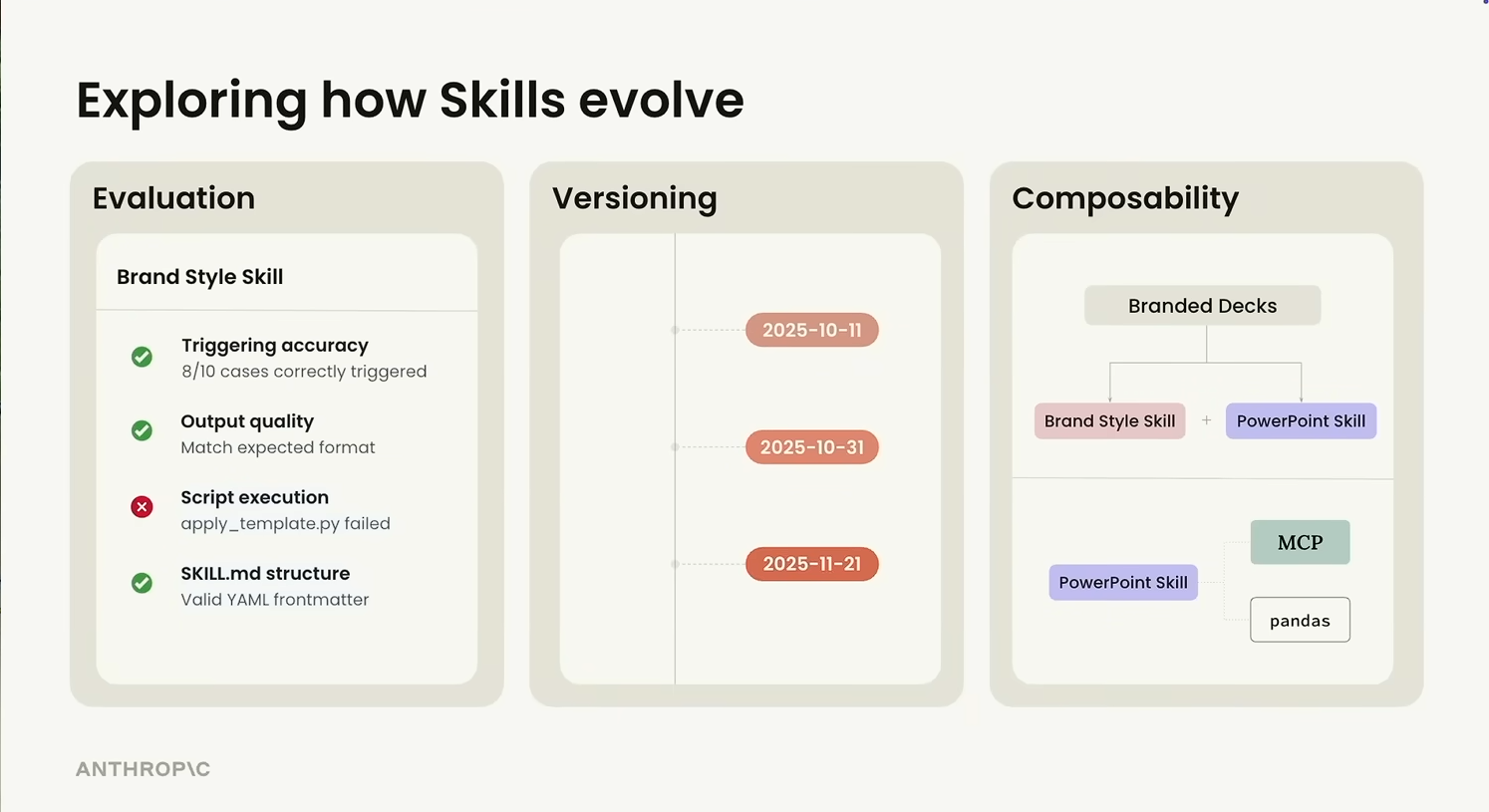
The other slide that stuck: thinking about a Skill the way you'd think about any other reusable artefact, on three real axes.
- Evaluation — does it actually fire on the right prompts, is the output the format you wanted, do the scripts run cleanly?
- Versioning — date-stamped iterations, because the right behaviour for a skill changes as the team's conventions change.
- Composability — one skill calling another. A "Branded Decks" skill that pulls in both a Brand Style skill and a PowerPoint skill, instead of a single monolithic deck-builder.
The composability point is the one to internalise early. If you write your skills too monolithic, you can't reuse the brand piece on documents, or the deck piece on un-branded content. Smaller skills, composed at trigger time.
Trends I'm watching
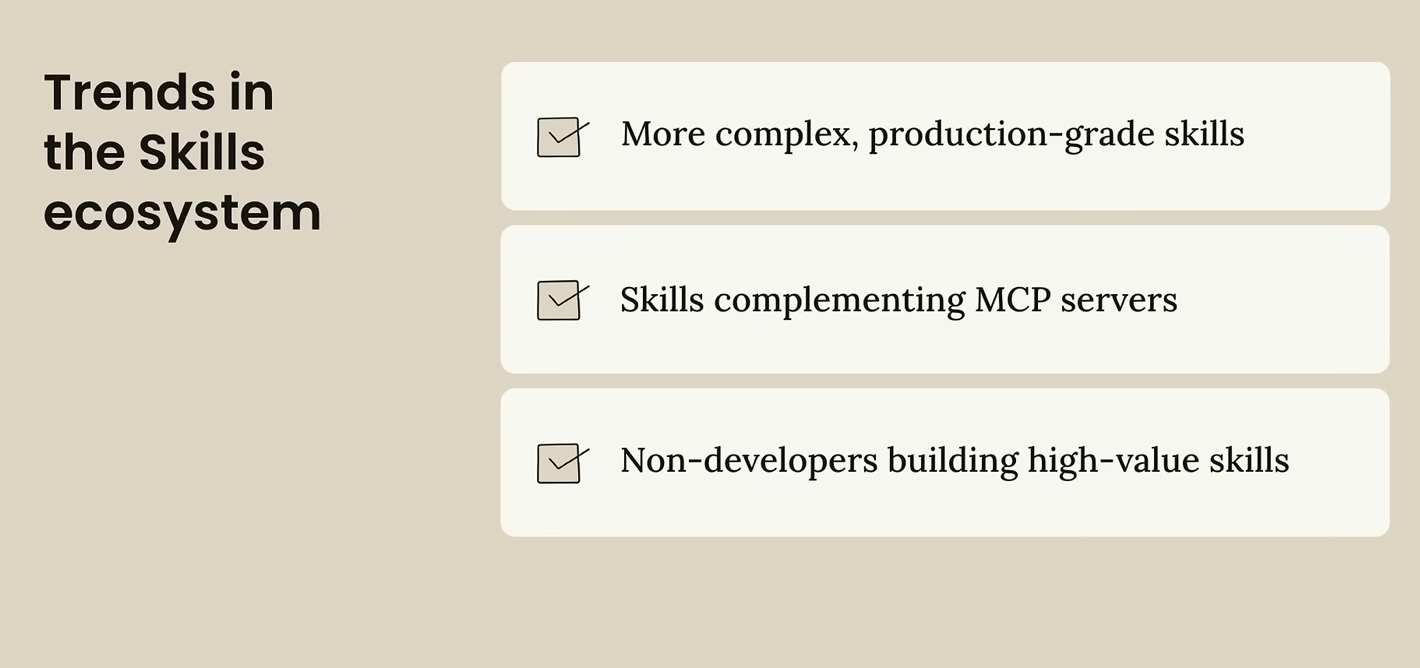
Three trends the talk called out, and all three match what I've been seeing in the wild:
- Skills are getting more production-grade — versioned, evaluated, owned by a team rather than a single contributor.
- They're complementing MCP servers, not competing with them — the right answer is increasingly "an MCP for the data, a skill for the workflow on top of it".
- And — this is the one I'm most interested in — non-developers are building high-value skills. The format is plain English in a folder. The barrier to write one is much closer to "writing a runbook" than "shipping a library", and that quietly opens the door for ops, support, finance, and design to ship their own.
If you take one mental model from that talk, take the stack picture. Almost everything else falls out of it.
Steps to create a Skill
-
01Identify the needA task you do repeatedly where Claude's default output isn't specialised enough. If you keep typing the same correction every chat, you've found a skill.
-
02Create the directory and write
SKILL.mdName and description first — that's the part Claude reads to decide whether to invoke. Then the instructions in the body. -
03Add supporting files (if you need any)Templates, schemas, scripts — drop them next to
SKILL.mdand reference them from the body. -
04Test that it actually firesGive Claude the kind of task it's supposed to handle and watch whether it picks the skill up. If it doesn't, your description is the bug — not the body.
The bit I think is most underrated is that the description field carries surprising weight. Write it vague, and Claude won't invoke the skill; you'll wonder why nothing happened. Write it too narrow, and it only fires on the exact phrasing you used as the trigger. Treat the description like an API contract you're writing for a teammate — make the trigger conditions explicit, list the cases it applies to, name the cases it doesn't.
What I learned shipping eight skills on one project
I went and did this on a side project recently. Installed three public skills — an Excalidraw diagram generator, the Supabase agent-skills bundle, and a changelog generator from awesome-claude-skills — and wrote four custom ones for the team's actual workflow: a design-token researcher, a backend-engineer scaffold for the API conventions I keep ending up at, a unit-test author, and a session-changelog writer.
A few things that didn't make it into the video.
Installing is unglamorous (in a good way)
Two patterns covered the whole library:
# Pattern A — clone someone's skill from GitHub
git clone https://github.com/<author>/<skill>.git /tmp/x
mkdir -p .claude/skills/<name>
cp -r /tmp/x/* .claude/skills/<name>/
rm -rf /tmp/x
# Pattern B — install a marketplace plugin
/plugin marketplace add <publisher>/<package>
The custom ones I just wrote by hand — a folder with SKILL.md, frontmatter, body. That's the whole ceremony. No build step, no registration, no tooling. After the first one, the second took three minutes.
Trigger phrases live inside the description
This is where I think most "I followed the docs and it didn't work" stories come from. My custom descriptions all ended up looking like this:
description: "Write and maintain unit tests using Vitest and Playwright. Use when asked to 'write tests', 'add test coverage', 'test this function', 'create e2e test', or when creating new services/API routes that need testing."
Listing the actual trigger phrases inline was the difference between "Claude picks it up reliably" and "Claude forgets the skill exists". The description isn't documentation — it's the matcher. It needs to read like an if-this-then-that block for the model, not a tagline.
The one skill that didn't fire (and what I think went wrong)
I added a ## Skills Usage (MANDATORY) block to CLAUDE.md listing every skill and when to use it. One of the entries was, almost verbatim:
@session-changelog: ALWAYS run at the END of every session that produces code changes. Append a structured entry toCHANGELOG.mdsummarising what / why / how.
Six of the seven entries worked exactly as written. The changelog one never fired. Not once.
My read: "end of session" isn't a phase the model can actually observe from inside the session. There's no signal in the conversation that says the user is wrapping up now. Skills fire on request-time triggers — what the user just said, or what Claude is about to do — not on temporal cues from outside the conversation. The six that worked all keyed off something concrete in the user's prompt ("write tests", "create API", "research design"). The changelog one keyed off an event the model can't see.
I haven't fully fixed this — but the answer is probably not a smarter description. The fix is a /changelog slash command I trigger manually, or a stop-hook in settings.json that runs the skill on session end. The skill itself was fine. The trigger was the bug.
If there's one thing I'd hand off from a week of using Skills in anger: the model is very good at picking up a skill once the trigger is clearly written into the description. It is not magic. It cannot infer that you'd like the changelog skill to fire just because you wrote the word "mandatory" in capitals.
Three I'd install before anything else
A short, honest list. These three are the ones I keep across every project — not because someone recommended them, but because removing them noticeably hurts.
frontend-design invocation. It's the difference between "a working UI" and "a UI I'd actually ship", at roughly zero extra cost per call./clear and survives new chats — old observations get auto-injected into fresh sessions so I'm not re-explaining project conventions every Monday. The "did we already solve this?" round-trip went from a half-hour archaeology dig through old transcripts to a single mem-search call.brainstorming (insists on a real spec before any code) and verification-before-completion (catches the "I think this works" instinct before it makes it into a PR), and the work is visibly better for them being there.The pattern across all three: they don't try to be smarter than me; they make me slower in the right places and faster in the wrong ones.
What I take away
Skills land somewhere between two things I'd already been doing: ad-hoc prompts I'd keep retyping, and the much heavier path of fine-tuning a model on my own data. They're text files. They live in git. You can share them. You can let the model decide when they apply rather than babysitting every conversation with the same five-paragraph prompt.
The other thing worth saying out loud: this isn't a brand-new idea. People were already cobbling this together with CLAUDE.md files, custom slash commands, and gist-shared prompts. The interesting move from Anthropic is baking progressive disclosure into the format itself — so a library of skills doesn't quietly degrade the model's context window the way a library of long prompts would.
The other thing the library makes you do is name the gaps. Until you sit down to write a backend-engineer skill, you don't have to admit that the version of the task you actually want is different from Claude's default. Writing the skill is the conversation with yourself about what your own conventions even are.
References and Resources
- Don't Build Agents, Build Skills Instead — Barry Zhang & Mahesh Murag, Anthropic — the talk the "moving up the stack" and "Skills ecosystem" sections are pulled from.
- Anthropic Engineering: Equipping agents for the real world with Agent Skills
- Claude Code: Extend Claude with skills
- Agent Skills — Claude API Docs (overview)
- Skill authoring best practices — Claude API Docs
- The Complete Guide to Building Skills for Claude (PDF)
- Agent Skills Marketplace (SkillsMP) — the third-party marketplace I've been browsing for things to install.
- awesome-claude-skills (ComposioHQ) — the community list I pulled the changelog generator from.
Massive Shoutout to CampusX
These notes started life as scribbles in the margins of the CampusX "Claude Code Skills: Full Guide" video. If you want the full walkthrough — the host's narration, the live demos, the bits I've collapsed into a sentence here — that's where to go. Same channel I credited in my Gen AI without the Hype post; still the clearest walk-throughs of fast-moving AI tooling I've come across. Subscribe to the CampusX YouTube channel if any of this resonated.